 PICKLE
01 Scoring & games
By default a game is played to 11 points, win by 2. A game ends the moment a team has reached the target and leads by the required margin — so 11–9 wins, but at 11–10 play continues (12–10, 13–11, …) until someone is two clear. The points target (commonly 11, 15 or 21) and the win-by margin are both configurable.
A match is best-of-1 by default — a single game decides it. Best-of-3 needs 2 games to win, best-of-5 needs 3. Individual games can carry their own overrides (for example, a deciding third game played as a short tiebreak to 7, win by 1).
Serving
The default is traditional side-out scoring: only the serving side can score, and losing a rally passes the serve (in doubles, to the partner, then to the other team). Rally scoring — a point on every rally — is available as an option per event.
Timeouts
Timeouts are off by default (0 per game); when enabled they run 60 seconds each. Both are set in Configuration.
02 Check-in & forfeits
Forfeit handling is off unless the operator turns it on. When it's on:
- Teams have a grace period of 10 minutes past a match's planned start before they can be forfeited, and a check-in deadline (default: the scheduled start time).
- If one team is present and the other is a no-show, the present team wins 11–0.
- If neither team shows, it's recorded as a double no-show — 0–0, no contest, no winner.
- If both teams are present, the match never auto-forfeits — it's played normally.
- A forfeit is staged with a 120-second countdown, during which the operator can confirm it, extend the wait, or cancel if a team turns up late.
QR self check-in
Optionally, players can scan a QR code at the venue to mark their own team present. Self check-in can only ever set a team present — it can't un-check anyone — and the operator can correct it from the dashboard. It feeds the same no-show / forfeit logic above.
03 Division formats
A grouping can be run in any of these formats — the classic set first, then the newer social, big-field and ongoing-league formats.
| Format | Field size | How it works |
|---|---|---|
| Knockout | 4, 8 or 16 | Single elimination — lose once and you're out. |
| Double elimination | 4, 8 or 16 | A winners' and a losers' division; you're out after two losses. The losers'-division champion must beat the winners' champion twice in the Grand Final (a reset game is created if they win the first). |
| Pool → knockout | 4–8 in one pool | Everyone plays a round-robin, then the top 2 or 4 advance to a small knockout (top 2 → a Final; top 4 → Semifinals + Final). |
| Round-robin | 3–10 | Everyone plays everyone once; the standings decide it. A playoff can be generated from the result (§8). |
| Large grouping | 6–64 | Round-robin groups feeding a championship playoff that places every team. Full detail in §7. |
| Teams | 2 teams of 4 | Two teams head-to-head over four doubles lines. No draw, no seeding, no 3rd-place — just one tie. Full detail in §4. |
| Swiss | 4–16 (even) | A fixed number of rounds, paired by record each round with no rematches; nobody is eliminated. The standings decide it. Detail below. |
| Compass (four winds) | 8 or 16 | A main East knockout whose losers drop into West, North and South consolation draws, so entrants keep playing past a loss. The East champion wins the division. Detail below. |
| Mixer (Mexicano) | 4–20 (×4) | Social doubles that scores individual players: partners rotate every round and each round re-pairs by standings. The top individual wins. Detail below. |
| Ladder | 3–20 | An ongoing challenge ranking with no fixed schedule — a win over a higher-ranked entry lifts you to their rank. Detail below. |
| Box / weekly league | 8, 12, 16 or 20 | Stacked boxes of four (each a round-robin); after every session the box winner promotes up and the bottom relegates down. Ongoing. Detail below. |
Matches are best-of 1, 3 or 5. In pool and large-grouping play, group/pool matches and the earlier knockout rounds are single games; the configured best-of applies to finals and to round-robin matches.
Swiss
A Swiss division runs a fixed number of rounds and nobody is knocked out — everyone plays every round. Round 1 is a seed fold (top half vs bottom half: seed 1 plays the first team in the bottom half, and so on). Each later round pairs teams by current record, closest records together, and avoids rematches — two teams only meet again if a rematch is genuinely unavoidable. A new round is generated only once the current one is fully decided. Fields are even, 4–16; there are no byes.
The number of rounds is configurable. By default it is enough to separate the field but never more than a full round-robin — about ⌈log₂(teams)⌉ rounds, with a floor of 3 and a ceiling of teams − 1 (e.g. 8 teams → 3 rounds, 16 teams → 4). The winner is the top of the standings by the usual cascade (§6); seed order is the final tiebreak.
Compass draw (four winds)
A compass draw keeps everyone playing well past a single loss. The main East draw is a single-elimination knockout; its losers drop into consolation draws by the round they lost in:
- East round-1 losers → West, East round-2 losers → North, and West round-1 losers → South.
- Every entrant therefore plays at least twice, and each wind (East / West / North / South) crowns its own bracket winner.
- The East champion wins the division. Field size is 8 or 16, seeded like any knockout (§5).
Mixer (Mexicano)
A Mixer is a social doubles format that scores individual players, not pairs. Partners rotate every round: within each group of four by current rank the court is (1st + 4th) vs (2nd + 3rd), and both players on the winning side bank that side's points. Round 1 pairs by seed; each later round re-pairs by the running individual standings. Games are single, rally-scored to a target of 21 (configurable), win by 1.
The field is a multiple of four, 4–20 players. The number of rounds is configurable (default roughly half the field, at least 4, never more than a full round-robin). The top individual on total points wins (ties broken by wins, then seed); a running leader is shown throughout.
Ladder
A Ladder is an ongoing challenge ranking with no fixed schedule. Entries start in seed order (seed 1 at the top). A lower-ranked entry challenges a higher one; if the challenger wins, it takes the defender's rank and everyone in between slides down one. Challenges are recorded as they happen — a challenger must sit below the defender, and the same two can't have two open challenges at once. Fields are 3–20. A ladder never finishes on its own: the current #1 is the standing leader, and the operator closes the division when the season is done.
Box / weekly league
A Box league splits the field into stacked boxes of four (box 1 at the top), each playing a small round-robin within the box. After every session, each box's winner promotes up one box and its bottom team relegates down one; the middle two stay — so the ladder re-sorts week to week. A session can only advance once every box match is complete. Fields are 8, 12, 16 or 20 (two to five boxes of four). Like a ladder it runs on: the top of box 1 is the current leader, and the operator closes it when the league ends.
Consolation / 3rd-place playoff
A knockout draw (or a pool→knockout advancing the top 4) can optionally add a 3rd-place playoff: the two semifinal losers play one game for the bronze medal, so the division decides 1st–4th rather than just the winner. It's a tick-box when you create the division and only applies when there's a semifinal (a 2-team final has no consolation). The bronze game schedules like any other match once the semifinals are done, and the division isn't marked complete until it's played.
04 Teams
A Teams division is a single head-to-head between two teams of four — 2 men and 2 women each. Choose Teams as the division category; division type, field size and the 3rd-place option don't apply, so you set only age and grouping. The four players are paired into four doubles lines:
- Men's — the team's two men.
- Women's — the team's two women.
- Mixed 1 — Man 1 + Woman 1.
- Mixed 2 — Man 2 + Woman 2.
Each line is a single game to 11 (you can change the target per division). The team that wins a line scores a point, so the tie ends 4-0, 3-1 or 2-2. A 2-2 tie is decided on total point differential across the four lines — and an exact dead heat is left for the operator to settle.
DreamBreaker (optional 2–2 decider)
A Teams division can instead settle a 2–2 tie with a DreamBreaker — an MLP-style rally-scored singles decider in which all four players take turns. It's an option you enable on the division; when it's on, a level tie has no winner until the DreamBreaker is played (rather than falling to point differential). The DreamBreaker is added as a fifth scored line, rally-scored to 21 by default (configurable), win by 2. Leave the option off and a 2–2 tie is decided on total point differential as above.
Score each line by hand, or send it to a court to score live on the scoreboard like any other match. There is no draw, no seeding and no consolation: a Teams division is exactly one tie between two teams, and it's marked complete once all four lines are in.
Court scheduling. The Men's and Women's lines share no players, so they can run at the same time. A Mixed line shares one player with each gender line, so it can't go live while a gender line that shares one of its players is being played — but the two Mixed lines can run together once the gender lines are done. In practice a tie runs in two waves: Men's + Women's, then Mixed 1 + Mixed 2.
05 Seeding
Knockout draws use standard 1-vs-N seeding: the top seed plays the bottom seed, #2 plays the second-bottom, and the halves are arranged so that the top two seeds can only meet in the Final. For a draw of 8 that's 1v8, 4v5, 2v7, 3v6; for 16 it's 1v16, 8v9, 4v13, 5v12, 2v15, 7v10, 3v14, 6v11.
Seeds can be set by hand, or generated from DUPR ratings (§11). Re-seeding a knockout by DUPR is refused once any match in it has been played, so completed results are never scrambled.
06 Standings & tiebreakers
Within a pool or round-robin group, teams are ranked by this cascade — each step only breaks ties left by the one above it:
- Match wins (most wins first).
- Head-to-head — among teams tied on wins, who beat whom. (If three teams beat each other in a circle, this can't separate them and it falls through to the next step.)
- Point differential — points scored minus points conceded.
- Points scored — total points for.
- Seed / entry order — a stable final tiebreak so the result is never arbitrary.
When comparing like finishers across different groups in a large grouping — for example, deciding which group runners-up or third-places advance — the comparison deliberately does not use head-to-head (the teams never met). Instead it uses win percentage, then points scored, then point differential. Win percentage is used rather than raw wins so that groups of unequal size are compared fairly.
07 Large groupings the big one
A large grouping takes 6–64 teams through round-robin groups into a championship playoff, and finishes by giving every team an exact final placing (1st through last) — not just a winner.
Groups
Teams are split into groups aiming for about five per group (the operator can override the group count). The reference case of 30 teams becomes 6 groups of 5. Groups are filled by a snake (serpentine) draw by DUPR: the strongest team goes to group 1, the next to group 2, and so on across the groups, then the draw reverses and snakes back — so every group ends up with a comparable spread of strength. Each group then plays a full round-robin (everyone vs everyone once), ranked by the cascade in §6.
Advancing to the championship
The top two of each group advance automatically. The championship draw is then filled out to the next power of two by taking the best of the remaining teams — the strongest third-places — ranked across groups by win percentage, then points scored, then point difference (no cross-group head-to-head; see §6).
Every team gets a placing
The championship isn't a simple knockout where losers go home — it's a full classification. Losing a round drops you into a placement path instead of ending your tournament:
- The Final decides 1st and 2nd; the semifinal losers play off for 3rd/4th.
- The quarterfinal losers play a 5th–8th division; in a 16-team championship the round-of-16 losers play a full 9th–16th division.
- So all 16 championship teams finish with an exact place: 1st, 2nd, 3rd … 16th.
The teams that didn't reach the championship are ranked across their groups and placed in their own divisions so they finish too: 17th–20th, 21st–24th, 25th–28th, and so on in blocks of four, then a single match for the last pair (e.g. 29th–30th). When an odd team is left over — a 31-team grouping — the tail three play a quick round-robin for their places rather than a lopsided division.
08 Round-robin → playoff
A standalone round-robin can spawn a knockout playoff seeded from its standings — choose how many advance (top 2, 4 or 8). The playoff can be created and scheduled up front: its draw stays to-be-decided until the round-robin finishes, then the top finishers drop into it (top seed vs lowest, and so on), re-seeding automatically as results land or are corrected. A round-robin has one playoff at a time; delete it to regenerate at a different size.
09 Scheduling & courts
When PickleBoard auto-schedules a day, it works through the matches in waves — placing the next one on the earliest free, eligible court — subject to the rules below. Keeping the show court busy is the top priority (see below); everything else fills in around it.
Keep teams moving
A team shouldn't sit idle for more than 20 minutes between its matches where the schedule allows it. The scheduler prioritises the longest-waiting teams as courts free up, and flags any match it has to place with a longer gap so the operator can add courts or tighten the buffer.
Match length & spacing
Default match durations are 20 min (best-of-1), 40 min (best-of-3) and 70 min (best-of-5), with a default 5-minute buffer between matches on a court. A division can set its own default duration.
Sticky courts & the show court
A grouping can be pinned to specific sticky courts, so its matches stay together and don't sprawl across the venue. The show court (the streaming court, Court 1 by default) is the scheduler's top priority — it's treated specially:
- It is never locked to a grouping — it stays a shared court that any match can use, so streaming never stalls.
- It is filled first every wave — the show court gets the next available match before any side court does, so it runs back-to-back with no long breaks while there is still play left in the day. A side court may sit idle, but the show court shouldn't.
- It is preferred for notable matches — Finals and Semifinals (and Grand Finals), plus any grouping flagged "feature on show court" — so the best matches are the ones being streamed. A notable match will wait a while for the show court rather than be tucked onto a side court.
Order & timing
- A match waits for the matches that feed it — a semifinal can't be placed until its quarterfinals are decided.
- In pool and large-grouping formats, the knockout / championship can't start until the pool or groups have finished — every group match is scheduled before that division's playoff matches.
- In a large grouping, the medal championship (the semifinals and final formed from the top finishers) is scheduled before the backdraw / placement playoffs (5th–6th, 7th–8th, …). Those lower placings don't affect the medals, so they fill whatever court time is left and are the first to be dropped if the day runs out of room — a medal match never loses a court to a placement match.
- Matches respect the day's start time and an optional division start time, and aren't scheduled to begin after the day's close of play (default 22:00).
- Court reservations (repairs, clinics, breaks) block out court time, and the scheduler routes matches around them.
Pull matches forward (gap-fill)
When a match finishes earlier than scheduled, the operator can have PickleBoard recommend pulling the remaining matches forward to reclaim the freed court time (optional, off by default; switch it on — or set it to apply automatically — on the Schedule tab). It re-plans using the same rules above, so a pulled-forward match still waits for its feeders, keeps teams' rest, respects court reservations and sticky/show courts, and is never moved before its division's start time or into the past — it simply starts as soon as a court and both teams are genuinely free.
10 Schedule conflicts
The schedule tool continuously checks for problems and offers one-click fixes. It flags:
- Court collisions — two matches overlapping on the same court.
- Reservation clashes — a match landing on a court that's reserved at that time.
- Court still busy — a match overdue to start because the live match on its court has run over.
For each problem it suggests up to three fixes — typically the same time on a free court, or the soonest open slot — each of which respects reservations and teams' other matches.
11 DUPR ratings
Players can carry a DUPR rating (range 1.0–8.5) and a DUPR ID on the roster. A team's seeding rating is the average of its players' ratings, looked up from the roster by name. Players without a rating use a per-division fallback (default 3.5), set to suit the grouping so unrated teams sit sensibly in the middle rather than always at the bottom.
Ratings can be imported with the teams when a division is created (a CSV with each player's rating and DUPR ID) — that also populates the roster — so the Seed by DUPR (knockout) and Snake-seed by DUPR (large grouping) buttons have ratings to work with. The DUPR ID is kept so results can later be reported back to DUPR.
A DUPR ID is treated as protected personal data: it is stripped from the public state and the public roster (a non-identifying "has a DUPR ID" flag is kept so operator badges still work), and the actual ID is only ever shown to Full-access administrators through the audited People views (§16). Seeding, the win-probability blend and DUPR export all still use it server-side — it simply never rides the player wire.
Win-probability bar
The broadcast overlay can show a live win-probability bar: each team's estimated chance of winning the match, with a small momentum marker for who gained on the last point. It blends the live score with the teams' DUPR ratings (the same by-name average used for seeding) — so a big lead reads as near-certain, while a clear rating edge gives the favourite a head start at 0–0. With no ratings on file it still works, driven purely by the score; it updates every point and accounts for games already won in a best-of match.
It's an unofficial on-screen estimate for players — entertainment only. It never affects scoring, seeding, advancement or results, and the trailing team is never shown below 2% while the match is live. Operators can switch it off per court (Configuration → Overlay display options).
12 Season leaderboard
The venue's Season Leaderboard ranks players across every completed match ever played here (the match history survives a tournament being torn down). The ranking is:
- Win percentage (highest first)
- Point differential
- Total wins
- Player name (alphabetical, as a final tiebreak)
A player needs at least a minimum number of matches (default 5) to be ranked, so a single lucky result doesn't top the table; players below that still appear, just unranked. Records are tallied by player name, and the table can be filtered by period (all-time, last 30 / 90 / 365 days), tournament and grouping.
13 Groupings & days
Groupings (e.g. skill or age groups) run concurrently and can be added or removed at any time. Each can have its own sticky courts and can be flagged to feature on the show court (§9).
A tournament's days are fixed when it's created — to change the number of days, tear down and re-create. A day can be renamed or given a calendar date and start/end times afterwards; because changing a date moves every match anchored to that day, the operator is asked to confirm it first.
Importing from a booking export
A tournament can be built by importing the booking system's export: the event name, days, skill groupings and every division (with players and DUPR ratings) are read from the file, and you review everything before anything is created. When the import finds a division that's too small to run on its own, it folds it into another division rather than leaving a one-team grouping:
- First, into a corresponding division at a different age — same category and skill — folding the niche age group into the more inclusive (lower) age that all its players already qualify for (e.g. a lone 60+ group joins the 50+ of the same skill).
- Otherwise, into a neighbouring skill level at the same age. When both a higher and a lower neighbour exist, it merges into whichever keeps the resulting sizes more balanced — the smaller neighbour (ties merge down).
- Anything that still can't be combined automatically is flagged too small in the review, where a "Combine into…" picker lets you fold it into another same-format division by hand (or leave it out). Every fold is listed in the review notes, and you can always adjust before confirming.
14 Data & fairness
History is never rewritten
Divisions and matches store players' names as typed, not links to roster entries. Editing or deleting a roster profile — or correcting a rating — never changes a match already played or archived. The roster is for autocomplete and seeding, not the source of truth for results.
Results are append-only
Completed matches and the activity log are written once and kept; nothing silently overwrites them.
Corrections are deliberate & gated
A mis-entered result can be reopened and fixed; the change cascades through the draw (re-advancing winners, recomputing standings). It needs the admin password when the gate is on, warns before clearing downstream matches, and is logged.
Player views are read-only
Public pages (standings, divisions, the leaderboard, this page) can be viewed by anyone with the link but can never change the tournament — scoring and edits stay with the operator.
15 How it all fits together
PickleBoard runs as a single authoritative service in the cloud. One instance runs the whole event — operators score over the internet and players follow on the very same instance. There is no on-site box and nothing to sync between: the cloud app is the single source of truth.
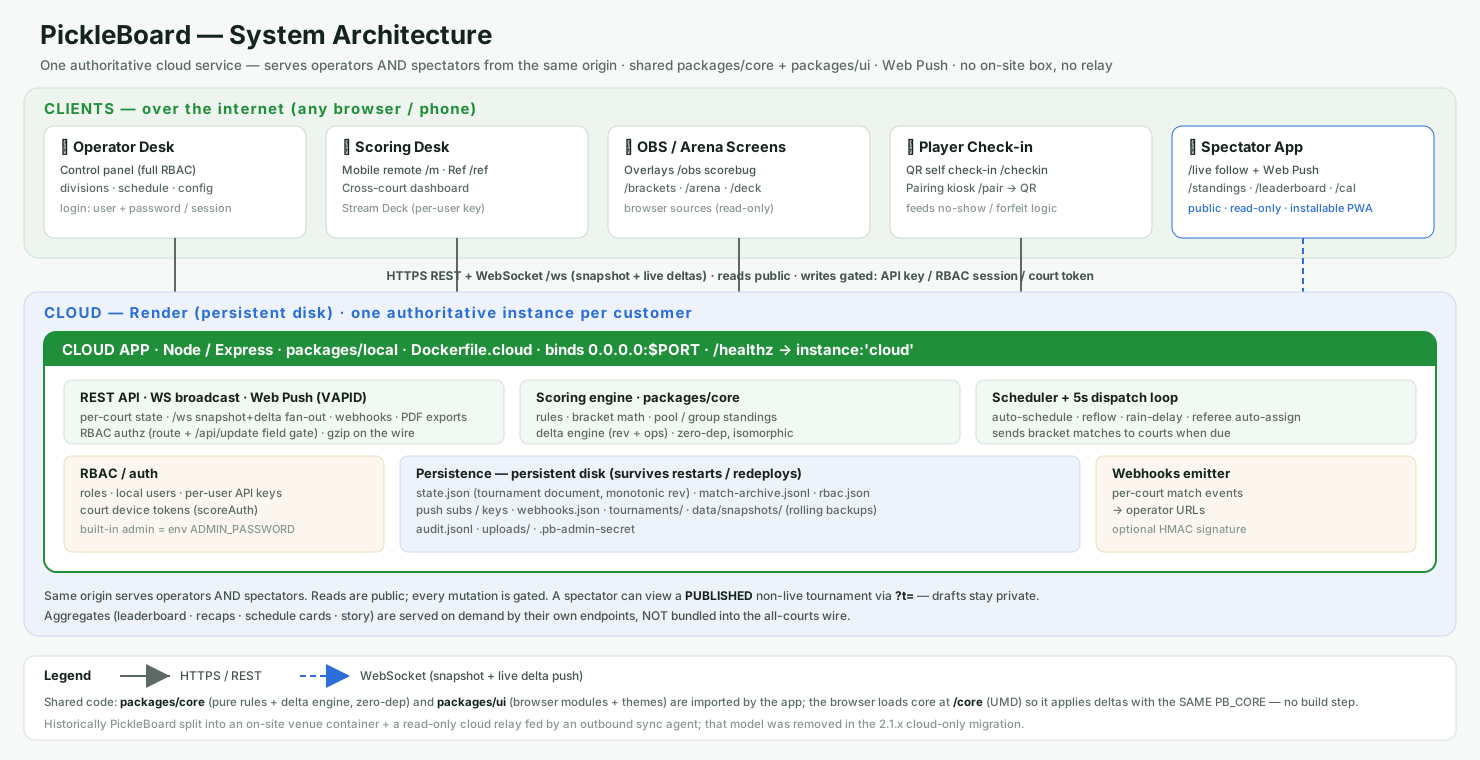
- The cloud app — authoritative. It owns the live tournament (courts, matches, divisions, schedule, roster, branding), runs the scoring engine and the scheduler, saves everything to Postgres (uploaded files to Cloudflare R2), and serves the operator, broadcast and player pages. All authority lives here.
- Operator & scoring surfaces: the Operator Desk (the control panel, governed by roles & users); the Scoring Desk (mobile remote, referee tool, cross-court dashboard, Stream Deck); OBS / arena screens (read-only overlays — scorebug, divisions, on-deck, arena); and Player check-in (QR self check-in and the pairing kiosk).
- Player app. On phones and the web, served by the same instance: follow a team (with a nudge before their match), live standings, the on-deck board, the season leaderboard, and an embeddable widget for the venue's own site. Players can view, but never change, the event.
The scoring rules and the change-syncing engine are shared code (the core), so every surface computes the same results. Connected clients get a fresh snapshot on join and then live updates over a WebSocket as the operator scores — the server stays the single source of truth.
Reaching the system
PickleBoard is reached at your instance's web address (for example https://<your-tournament>.example.com). Operators sign in there; the operator, broadcast and player links all derive from that address, so sharing them is just sharing the URL. Who can do what is still governed by the access rules in §16.
16 Access, accounts & people
PickleBoard can run wide-open for a single operator, or with named accounts — for operators and for players and fans — that each see and change only what their role allows. Reads stay public by default; every mutation is gated.
Operator sign-in
- Open mode (no admin password). The control panel loads straight away with full access, and existing integration keys (OBS, Stream Deck, the mobile remote) keep working. This is the default for a single-operator setup. (If no admin password and no users are configured, operator surfaces send you to a sign-in page rather than falling open.)
- Accounts mode (admin password set). Operator pages ask for a username and password. A built-in administrator (username "admin", the admin password) always has full access and manages everyone else. The admin builds roles and creates users; each signs in with their own credentials. The admin password comes from the venue's configuration and cannot be changed from inside the app.
- Passkeys (Face ID / Touch ID / security keys). Any signed-in account can enrol one or more passkeys from My Profile for passwordless sign-in; the login screen offers an enrolled passkey automatically. Passkeys are stored privately on the server and never leave it.
Player accounts
- Anyone can register — name, an email (their sign-in), an optional DUPR ID and a password with strength rules — after a privacy-policy consent step. Email confirmation and password reset go out over email when the venue has configured it.
- New registrants get the view-only Player role and are matched back to the player directory (by DUPR ID or name). An organiser confirms the link before the account's personalised history unlocks — a guard against someone claiming another player's record.
- A signed-in, verified player gets My Profile (photo, bio, display name) and My History (their results across every event here), and the player surfaces personalise to them (a "You" marker on their entry, a "just my matches" view). Accounts are optional — the public surfaces still work signed-out.
- "All users must log in." An admin-only switch (off by default) that puts every page — including the public player views — behind sign-in. The unattended broadcast overlays (OBS / venue boards) and their public match wire stay reachable so a stream never goes dark.
People & the directory
- Players and operators live in one directory (User Management). Each person is one row joining their account and their competitor record, so someone who both administers and competes is a single entry.
- A person's Type — Imported User (added by a tournament, no login), User (registered, not yet matched to a competitor record) or Player (registered and merged) — is kept separate from their access Role.
- DUPR merge review. When a DUPR ID collides between an account and a directory record, the system does not silently link them: it raises a review showing both side by side, which an organiser can approve (merging into one Player) or reject with a reason shown back to the person.
Roles & per-pane access
- A role is a named set of permissions — one access level for every pane (live scoring, division management, the schedule, configuration, user management, and so on). Built-in roles include Full Admin, a least-privilege Operations & Commentary role, and view-only Player; admins can build their own.
- Each pane is No access, Read-only or Read / write. The Divisions pane adds Send match only (a court runner can send and revoke matches but not edit or score). The User Management pane instead tiers by personal data: Limited (no PII) can view and manage everyone but never their protected data, while Full (with PII) adds it plus account erasure and access management.
- Every user is assigned exactly one role, and the navigation only shows what that role can reach. A signed-in player cannot reach operator surfaces at all — after sign-in everyone lands on a chooser showing only the areas they're entitled to.
Personal data & privacy (GDPR)
- Protected data is tiered and audited. Email, legal name and DUPR ID are reserved to Full-access user managers, and every view of protected data is written to the activity log. The DUPR ID is kept off the public wire and roster entirely (§11).
- Consent is recorded at registration with the policy version, and a drafted privacy policy is served for the venue to complete.
- Right to erasure. A player can delete their own account, or an organiser can on request. Erasure de-identifies the person while leaving match results intact — history isn't corrupted, but the person is no longer identifiable.
How it is enforced
- Writes are checked on the server. Every state-changing request is authorised against the signed-in user's role at a single gate, so a limited account cannot change anything its role forbids — even outside the control panel. Shared save endpoints are checked field-by-field, so a scorekeeper can update the score on an endpoint that also carries configuration fields they are not allowed to touch.
- Visibility is role-appropriate, not the security boundary. Hiding a pane gives each user a focused interface; the real protection is the server-side write check above and the PII tiering.
- Identity is attributed. Each operator gets their own API key, so machine/API actions are recorded under that person's name in the activity log alongside their on-screen actions.
Accounts, roles, passwords, passkeys and API keys are stored in the app's private store, never in the tournament document, so they are never broadcast to players. A nullable organisation field on users, roles and tournaments leaves room for the multi-organisation tier (clubs, platform tenants) without a data migration.
Announcements & notifications
- Venue announcements are short operator-posted messages with an optional auto-remove timeout. Public ones appear on every player and broadcast surface (and can run as an OBS ticker); private ones are management-only and never reach players. Posting requires the announcement permission.
- Match alerts. Anyone can follow a team or player (following one partner of a pair works too) and be notified ~2 minutes before their match, when it goes live, and when it finishes (with the real point score) — per device, no account required. Signed-in operators can also opt into Management Alerts for announcements. Delivery is by web push, so alerts arrive with the app closed.
17 Keeping score
Score is kept on the system. Depending on the event, it is entered by the operator, a referee, or a designated scorekeeper — who may use a handheld tablet paired to that court. A paired tablet can only score the one court it was paired to; it cannot change anything else.
An optional automated voice may call the score aloud at a court as a courtesy aid. It is a convenience only — the official score is the one recorded on the system (and, in self-officiated play, the score the server calls before serving).
If you believe the score is wrong, say so before the next serve. Corrections are made deliberately by the operator, cascade through the draw where needed, and are recorded in the activity log.
Withdrawals & substitutions
If a team withdraws during the event, the operator records it and chooses how it affects the draw: either already-played results stand and the team's remaining matches are awarded to its opponents, or the team is scratched entirely — its matches are voided and group/round-robin standings recompute as if it never entered. A team that never takes the court is marked did not start. (A team that has already won a knockout match can only be handled the first way, so the played-out draw stays intact.)
A substitution — a partner swap or a stand-in — keeps the team's seed, record and place in the draw; only the line-up changes from that point on, and already-played scores are unchanged. Every withdrawal and substitution is recorded.
18 Streaming, recording & branding
Matches may be livestreamed, recorded and photographed, and shown on courtside displays, broadcast overlays and the public player app.
Your team or player name, grouping, live score and results may appear on these surfaces — the scorebug, divisions, standings, "up next" boards and on-screen name straps — and in shareable clips and recaps, alongside event and sponsor branding.
By entering the event you consent to being filmed, recorded and photographed, and to your name and results appearing on the event's screens, stream, recordings and public player pages. If you need your name withheld, speak to the organiser before play.
Match-complete grace period
When a match ends, the broadcast overlay holds for about 10 seconds before it shows the final "X WINS" statistics panel and moves on to the next match. This is a deliberate buffer: if the final point is disputed, the operator can undo it within that window and play resumes on the live scoreboard with nothing having flashed up. Undoing the last point inside the grace period cancels the result panel automatically.